Sourcegraph

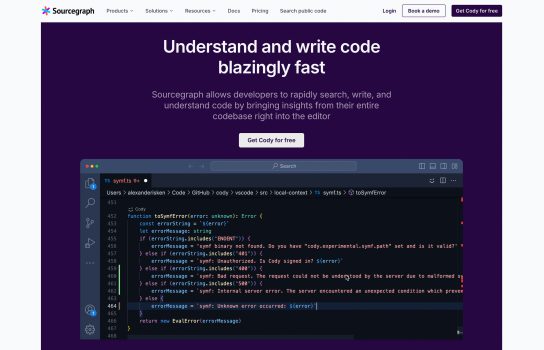
Sourcegraph is a developer tool for code search and intelligence designed to help developers and teams better understand, navigate, and manage their codebases. It offers features that simplify exploring and analyzing code, especially in large and complex repositories.
Our Verdict
What is Sourcegraph
Sourcegraph is a code-intelligence and developer tools platform designed to help engineers explore, understand, and operate large codebases. It offers features like universal code search, cross-repository navigation, code intelligence (jump-to-definition, find-references), insights into code health, and includes AI-assisted tools (e.g., for code writing or auditing). It’s particularly aimed at organizations working with many repositories, multiple languages and frameworks, and seeking to increase developer productivity, maintain code quality, and perform large-scale code changes.
Is Sourcegraph worth registering and paying for
if your team meets certain criteria.
Sourcegraph is a strong investment when:
- Your organization has many repositories, multiple languages and teams, and needs unified code search/navigation across them.
- You care about code quality, large-scale refactoring, analytics (code insights), or scaling engineering productivity.
- You require enterprise-grade features like self-hosting for security, integrations, monitoring, etc.
However, if you’re a solo developer, working with a small codebase, or rarely perform cross-repo search or large-scale refactoring, the value proposition may be weaker — the free tier might suffice, or you might wait until your needs grow.
Verdict: For mid-sized to large engineering teams, yes — definitely worth registering and paying for. For smaller teams or simpler use-cases, evaluate the free features first.
Our experience
Sourcegraph isn’t just a tool; it’s a game-changer if you’re drowning in a sea of microservices, multiple repositories, or just a massive, complex codebase that no single person can hold in their head. The phrase “code intelligence platform” sounds a bit like corporate jargon, but the experience delivers on the promise.
Here’s a breakdown of what it actually feels like to use it, especially for a developer or engineering lead dealing with enterprise-scale code:
1. Universal Code Search: The “Aha!” Moment
Forget that feeling of needing to git clone ten different repos just to find out where a specific API or configuration variable is being used. Sourcegraph’s Universal Code Search is the standout feature.
- The Experience: It feels like a cross between Google Search and your favorite IDE’s “Find in Files,” but scaled up to your entire organization’s code, no matter if it lives on GitHub, GitLab, or some ancient self-hosted instance. It’s incredibly fast, supports powerful regex and structural searches, and is aware of file types and commit history.
- Human-Style Review: “I can finally answer ‘Who else is using this old library?’ in literally five seconds instead of four hours of frantic repo-hopping. Seriously, tracking down a rogue security vulnerability or a deprecated method becomes a self-service, five-second job, not a cross-team spelunking expedition.”
2. Code Intelligence and Navigation: Context is King
This is where Sourcegraph starts to become a powerful learning and onboarding tool. Its “Code Intelligence” means more than just a smart index; it connects the dots.
- The Experience: Click on a function or symbol and you don’t just jump to the definition in the current file; you can jump to the definition in another repository, find all cross-repo references, and get tooltips with context, all without leaving the web browser or your IDE (via extensions). It uses a “code graph” to understand the relationships.
- Human-Style Review: “When I onboard a new hire, I just tell them to use Sourcegraph to look up a service. It’s like having a senior engineer in your pocket who can instantly map out the dependencies and explain ‘this class is called by these three other projects in completely different languages.’ It cuts weeks off the ramp-up time.”
3. AI Assistant (Cody): The Search-First Difference
Sourcegraph’s AI assistant, Cody (or the latest iteration, Amp), differentiates itself from assistants like GitHub Copilot by being “search-first.” Instead of just predicting the next line based on local context, it uses the platform’s ability to search your entire codebase for relevant context first.
- The Experience: When you ask the AI to “write a function to call the User service to fetch a profile,” it doesn’t just guess a generic pattern. It finds the existing internal API contracts and authentication logic from other repos using its deep search, and then generates code that actually compiles and works within your specific architectural patterns.
- Human-Style Review: “Most AI coding tools are great for boilerplate. Cody is different because it’s not a hallucinating parrot; it’s a librarian who has read every line of your company’s code. I use it less for line-by-line coding and more for cross-repo Q&A, like ‘How did we solve X problem in Service Y six months ago?’ It’s about leveraging our own company’s knowledge, not just the public internet.”
4. Batch Changes and Code Insights: Moving Mountains
For engineering leadership and platform teams, these features solve the hardest problems: massive refactoring and tracking code health.
- Batch Changes: This lets you define a programmatic change (e.g., “Update every instance of
Log4jfrom version 2.1 to 2.17 across 300 repositories”) and execute it at scale, creating PRs/MRs for every affected repo and tracking them to completion in a single dashboard. - Code Insights: This is essentially using the powerful search queries as a real-time reporting tool. You can create charts to track migrations, monitor the number of old Java versions still in use, or see the proliferation of a ‘code smell’ over time.
- Human-Style Review: “Before Batch Changes, a company-wide library upgrade was a six-month project that required begging 50 different team leads. Now, one person can define the change, run it, and monitor the progress of all the generated PRs from a single screen. It literally lets us execute multi-year tech migrations in a few months. The Code Insights dashboards are brilliant for showing our CTO, in real-time, how fast we’re killing off technical debt.”
The Verdict
Sourcegraph is a premium, enterprise-focused tool whose value scales directly with the size and complexity of your code. If your team is small, has a handful of repos, and uses mostly one language, it’s likely overkill.
But if you’re in an organization with:
- Hundreds (or thousands) of repositories.
- A mix of legacy and modern languages/frameworks.
- A problem with context-switching, knowledge silos, and slow developer onboarding.
- A need to perform large, coordinated refactors or security sweeps.
…then Sourcegraph goes from being a helpful utility to an essential piece of infrastructure that dramatically increases developer velocity and reduces cognitive load. It’s the infrastructure for understanding your code at scale, which is the biggest bottleneck in large-scale development.