Adobe Express

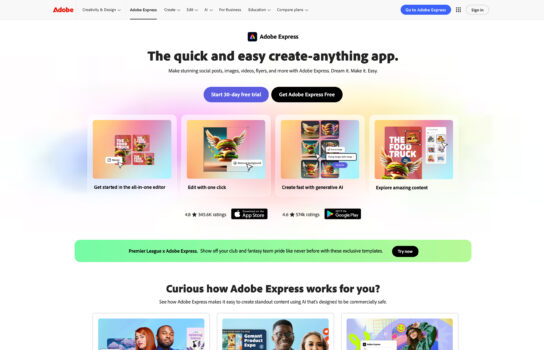
Adobe Express is an all-in-one design and content creation platform developed by Adobe for users of all skill levels. It enables you to easily create social media graphics, videos, flyers, posters, logos, and more—all within a simple, drag-and-drop interface.
Our Verdict
What is Adobe Express
Adobe Express is an all-in-one design and content creation platform developed by Adobe for users of all skill levels. It enables you to easily create social media graphics, videos, flyers, posters, logos, and more—all within a simple, drag-and-drop interface. Adobe Express combines professional-quality design templates, AI-powered tools, and integration with Creative Cloud (including Photoshop and Adobe Stock assets), making it ideal for creators, marketers, small businesses, and educators who want to produce stunning visuals quickly.
Is Adobe Express worth registering and paying for
Adobe Express is worth it if you want to create professional-looking content quickly without mastering advanced design software. The free plan is great for casual users, while the premium plan unlocks access to Adobe Stock images, brand kits, and advanced editing tools—ideal for small businesses, marketers, and social media creators who need consistent branding and quality visuals. However, for professional designers, traditional Adobe apps like Photoshop or Illustrator may still be necessary for full creative control.
Our experience
Let’s be real: when I first heard Adobe was revamping its easy-to-use platform (the old “Spark”), I was skeptical. As someone who lives and breathes in Photoshop and Illustrator, these simple, template-driven tools often feel like they lack the finesse I need. But honestly? Adobe Express has genuinely surprised me—it’s not trying to replace the ‘big’ apps; it’s a brilliant, fast companion that solves the speed problem of content creation.
The Good: Speed, AI Magic, and the Creative Cloud Link
The biggest win for me is the sheer speed of execution. I can go from a vague idea for an Instagram Story or a simple flyer to a polished, on-brand graphic in literally five minutes. The drag-and-drop interface is buttery smooth and blissfully uncomplicated, which is exactly what you need when you’re racing a content calendar deadline.
The AI-powered Quick Actions are where the real magic is. One-click background removal is flawless—it’s the kind of precision I used to have to spend a minute or two on in Photoshop, now it’s instant. And the integration of Adobe Firefly’s Generative AI features (like Text-to-Image and Generative Fill) is a blast. If I need a placeholder image or a quirky text effect, I just type a prompt, and boom, I have a commercially safe asset ready to go. It completely eliminates the dreaded “starting from scratch” moment.
But the absolute killer feature for me, as an Adobe user, is the Creative Cloud integration. My Brand Kits—with my client’s exact colors, fonts, and logos—are available instantly. I can even bring in a complex .psd or .ai file, make minor edits to a social post in Express, and everything stays perfectly synced. That’s a workflow advantage that its competitors just can’t touch.
The Reality Check: What It Isn’t
For a tool this easy, there are always trade-offs. If you’re a beginner, you might find the sheer volume of Adobe Stock assets and premium features on the paid plan slightly overwhelming at first. And for seasoned pros, a few things are missing: don’t expect the granular control of Photoshop’s layers, complex vector manipulation, or deep typography controls (like kerning). It’s a sprint tool, not a marathon tool. Its video editing is also fine for simple social media clips, but it’s no Premiere Pro.
Who Should Use It?
It’s a no-brainer for small business owners, marketers, and educators. You don’t need a design degree to make something look genuinely professional. The template library is high-quality and constantly updated with current trends.
For fellow designers, I now use it daily. It’s perfect for all those quick, high-volume assets (social media posts, ad variations, quick PDF edits) that used to clog up my time in the bigger apps.
The Verdict
Adobe Express is the perfect middle ground: it has the approachability of simpler platforms, but it brings the power and quality of Adobe’s creative engine along for the ride. It’s fast, reliable, and finally makes professional-grade design feel accessible to everyone. Definitely worth a try, especially if you’re already in the Adobe universe.