AI Studios
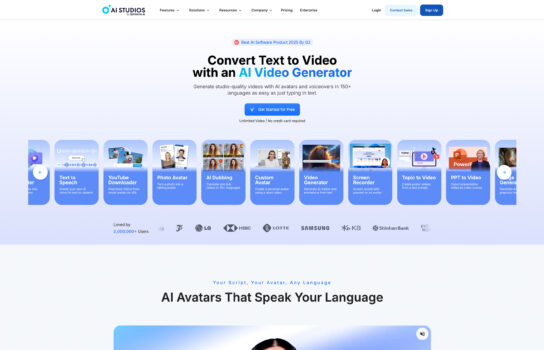
AI Studios by DeepBrain AI is built for anyone who needs professional, camera-ready videos without hiring a production crew. The platform offers over 150 realistic AI avatars, with the option to design custom ones, which makes it flexible for brands that want a unique face or spokesperson.
Our Verdict
What is AI Studios
AI Studios by DeepBrain AI is built for anyone who needs professional, camera-ready videos without hiring a production crew. The platform offers over 150 realistic AI avatars, with the option to design custom ones, which makes it flexible for brands that want a unique face or spokesperson. Its text-to-video engine is straightforward—just drop in a script, URL, or even a PPT, and it turns that content into a polished video in minutes. The voice and dubbing features are especially useful for global teams: over 110 languages are supported, and the lip-sync is convincing enough for training, marketing, or customer communication. On top of that, it comes with ready-to-use templates, auto-captions, and branding tools, so you can quickly align content with your company’s style. For teams, collaboration tools and API access make it possible to scale video production and integrate directly into workflows. Overall, it’s clearly designed with businesses and organizations in mind—efficient, customizable, and polished.
Is AI Studios worth registering and paying for
If you’re a business, educator, or content team that needs to churn out lots of professional videos without hiring a film crew or spending hours editing, then AI Studios is definitely worth it. The avatars and voices are among the more realistic options out there, and the ability to localize into over 100 languages makes it a big win for global communication. That said, if you’re just a solo creator or on a tight budget, the cost might feel a little steep compared to lighter tools. In short: great value for organizations, but probably overkill for casual use.
Our experience
We chose to explore AI Studios for a team project where we needed to create professional training videos for a client’s corporate onboarding program, and it was a transformative experience that made our collaborative workflow seamless, creative, and highly efficient. As a team of non-technical members—including a learning and development (L&D) specialist, a content creator, and a project manager—we needed a platform that empowered everyone to contribute while delivering high-quality, multilingual video content. AI Studios’ AI-powered video generation, extensive avatar library, and collaborative features enabled our team to produce engaging videos that met our client’s global needs, though we noted some subtitle synchronization issues and limited template variety.
The AI video generator was a standout, allowing our content creator to convert scripts and PPT files into polished videos in minutes, using over 150 AI avatars and 80+ languages. We collaboratively customized scenes, adjusting avatar gestures and voiceovers, with real-time previews ensuring alignment with the client’s brand. The ChatGPT-powered script assistant helped our L&D specialist brainstorm and refine training narratives, sparking team discussions to enhance clarity and engagement.
Collaboration was streamlined through AI Studios’ Team plan workspaces, enabling us to invite members, assign roles, and share projects for synchronized editing. We shared video drafts via links, allowing real-time client feedback that we reviewed in team huddles to finalize content quickly. The auto-captioning feature added subtitles with one click, though occasional lags in syncing with avatar speech, as noted in some reviews, required minor manual adjustments.
Integration with tools like PowerPoint and APIs allowed our project manager to import presentations and connect to external data, ensuring dynamic content. The ability to generate multi-avatar scenes added depth to our training videos, tested collaboratively for impact across platforms. While the 100+ templates were versatile, the selection felt limited compared to competitors, requiring extra customization for unique branding needs. The free demo was great for testing, but we opted for the Team plan—starting at $55/month per seat—for advanced features like gesture control and translation, though pricing transparency could improve.
Our team’s experience with AI Studios was cohesive, empowering, and made us feel like a unified force capable of delivering professional videos. It’s ideal for L&D teams, marketers, or non-technical teams looking to create multilingual videos collaboratively without expertise. If your team wants to streamline video production while working together, AI Studios is definitely worth checking out, though consider external tools for extensive template variety.