Fathom

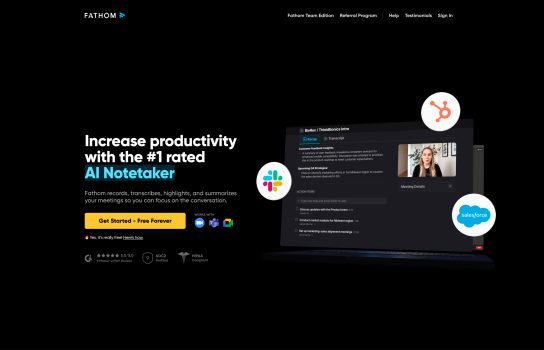
Fathom is an AI-powered meeting assistant designed to significantly improve your efficiency in Zoom meetings. All you need to do is launch it when you join a Zoom meeting.
Our Verdict
What is Fathom
Fathom is an AI-powered meeting assistant built specifically to make Zoom meetings more productive and effortless. Once launched during a Zoom call, it automatically records, transcribes, and summarizes the conversation without you needing to take any notes. Fathom highlights key moments, organizes action items, and lets you quickly revisit past discussions through a searchable meeting history. With integrations that sync notes to tools like CRM systems, Notion, and Slack, it streamlines post-meeting workflows and saves a significant amount of time for busy professionals.
Is Fathom worth registering and paying for
Fathom is absolutely worth considering if you rely heavily on Zoom for meetings and want to save time on note-taking, follow-up tasks, and documentation. Its automatic transcription, instant summaries, and seamless integrations can dramatically improve workflow efficiency for teams, managers, sales professionals, and remote workers. If you’re mainly using Zoom and want a reliable AI assistant to handle your meeting notes, Fathom provides strong value. However, if you switch between multiple meeting platforms, you might find its Zoom-only focus limiting.
Our experience
I spend half my life in Zoom meetings, and the worst part was always the aftermath: wading through recordings or trying to decipher my hurried notes. Fathom is the first tool I’ve used that genuinely solves this problem by being 100% integrated into the Zoom experience.
The moment you launch it during a call, Fathom is there, taking over the job of documentation entirely. It automatically records and transcribes everything, and the best part is knowing I don’t have to touch a notepad or a keyboard for the rest of the meeting. I can actually be present and focus on the conversation.
The real power kicks in right after the meeting. Fathom’s AI doesn’t just give you a transcript; it generates a concise, perfectly formatted summary. It highlights all the key moments and, crucially, extracts the action items—meaning I immediately know what needs to be done and who agreed to do it. It’s a huge mental relief knowing I’ll never lose a decision in a sea of transcript text again.
For anyone who relies on a CRM or project management system, the integration is a game-changer. Fathom seamlessly syncs those notes directly to tools like Notion, Slack, and our CRM. This cuts out a ton of post-meeting manual labor. Instead of copying and pasting, the notes and action items are just… there.
If you are a busy professional whose day revolves around Zoom and you’re looking to save hours every week on follow-up and documentation, Fathom is a must-have. It simplifies the chaos and truly makes meetings feel more productive.