Otter

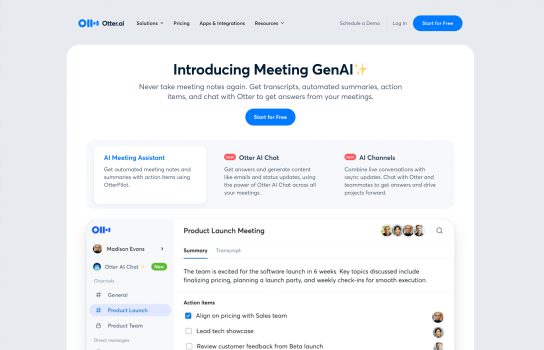
Otter is an AI‑powered speech‑to‑text tool designed to help users efficiently capture and organize spoken content. It uses advanced machine learning to transcribe meetings, lectures, interviews, or conversations into searchable, shareable text.
Our Verdict
What is Otter
Otter is an AI-powered speech-to-text tool designed to capture, transcribe, and organize spoken content with accuracy and convenience. It can convert meetings, lectures, interviews, and conversations into searchable text in real time, making it especially useful for students, professionals, journalists, and teams that rely on detailed notes. Otter offers features like speaker identification, automated summaries, action-item extraction, and seamless integrations with Zoom, Microsoft Teams, and Google Meet. Users can easily share transcripts, collaborate with teammates, and export notes in various formats, helping streamline workflows and improve productivity.
Is Otter worth registering and paying for
Otter is a powerful speech‑to‑text tool ideal for those who frequently record and transcribe audio. If you need to boost transcription efficiency, manage large amounts of text, and have the budget, the paid version can be a worthwhile investment. However, if your needs are basic, the free version may be enough. It’s worth trying the free trial, assessing your needs and budget, and comparing alternatives before making a decision.
Our experience
Before I found Otter.ai, I was constantly doing that annoying juggling act: trying to lead a discussion, process new information, and type franticly all at once. I’d end every meeting with a set of messy notes and a vague feeling that I’d missed half the conversation. That stress is completely gone now.
The best thing about Otter is how hands-off it is. I linked it to my calendar once, and now their OtterPilot automatically joins all my scheduled calls (Zoom, Google Meet, whatever). It’s like having a silent, hyper-competent assistant who never asks for coffee. I no longer have to worry about hitting record or spending the first five minutes getting permissions sorted out. It just works.
Because it handles the documentation, I can finally drop the pen and actually be present in the meeting. I can look at my colleagues, focus on their points, and contribute fully, all while knowing that every word—literally every word—is being captured in real time.
The transcripts are super accurate, but the real power kicks in right after the call. Otter doesn’t just give you a giant wall of text. It automatically organizes it, tagging speakers and highlighting important stuff.
The AI Chat feature is what saved my life last week. I didn’t have time to re-read an hour-long client interview, so I just asked Otter, “What were the three non-negotiable requirements for Phase 2?” and it pulled the exact answer from the transcript in seconds. It turns hours of talking into a searchable knowledge base.
Look, it’s not magic, and you shouldn’t expect it to be. If you have clear, polite conversations, the accuracy is flawless. But if two people talk over each other, or if someone has a very strong, fast accent, it will sometimes stumble. I have to go in and make quick edits maybe 5% of the time, especially when technical jargon is involved. Also, heavy users need to know that the free tier limits can be tight, so be ready to upgrade if you live on video calls.
If you are tired of being the team scribe and want to reclaim your focus during conversations, Otter.ai is absolutely essential. It’s one of the few tools I use daily that genuinely makes my workday feel lighter and less chaotic.